
Do you want to combine product images and looking for the website that should be free of cost and do not require any login then usig our website you can easily combine product Images
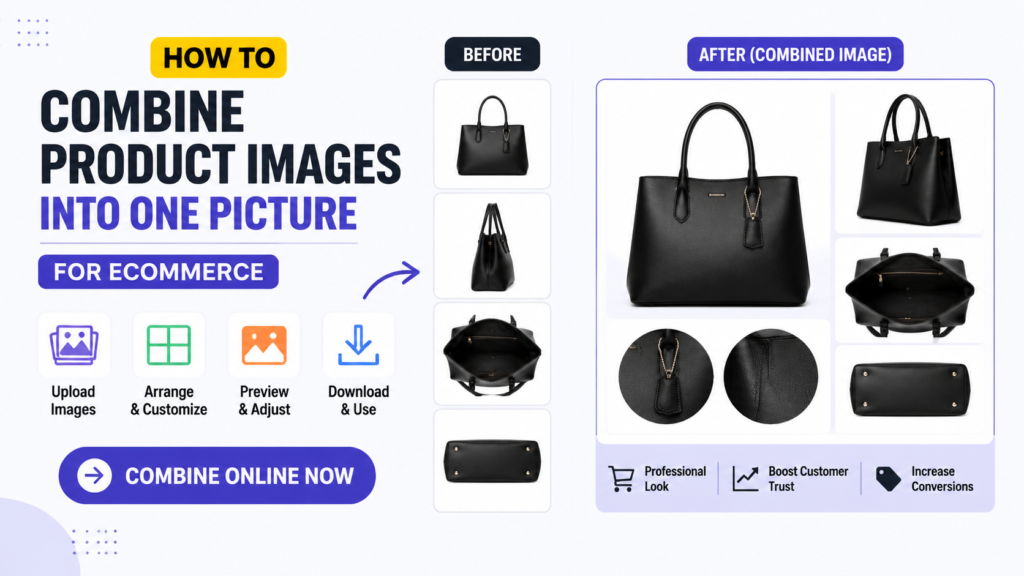
One of the easiest ways to make your products look more attractive is to Combine Product Images into a single professional-looking picture. Instead of uploading multiple separate photos, you can merge several product images into one clean layout that highlights different angles, features, colors, or product variations.
With CombineJPGOnline.com, you can easily Combine Product Images online for free without installing software or creating an account. The tool works directly in your browser, making it fast, secure, and beginner-friendly.
In this complete guide, you’ll learn everything about combining ecommerce product images, why it matters, how to do it, best practices, and frequently asked questions.
Also Check: How to Reduce Image Size Without Losing Quality – Complete Guide
What Does It Mean to Combine Product Images?
To Combine Product Images means merging two or more product photos into one final image. Instead of displaying several separate files, you create a single organized image that showcases multiple views of your product.
For example, you can combine:
- Front and back product views
- Side angles
- Close-up feature shots
- Packaging images
- Product dimensions
- Different color variants
- Before-and-after comparisons
- Accessories included with the product
The final image looks professional and helps customers understand the product quickly.
Why to Combine Product Images for Ecommerce?
Online shoppers cannot physically touch or inspect products. Images become your salesperson. Combining multiple product photos provides customers with more information while keeping your product gallery organized.
Benefits include:
- Better product presentation
- Cleaner product listings
- Faster customer understanding
- Improved shopping experience
- More professional appearance
- Reduced image clutter
- Higher engagement
- Increased conversion rates
Professional image layouts often make products appear more trustworthy and premium.
Who Should Combine Product Images?
Many professionals can benefit from this tool.
- Ecommerce Sellers: Perfect for Amazon, Etsy, Shopify, WooCommerce, and eBay stores.
- Small Business Owners: Display products professionally without hiring designers.
- Dropshippers: Create attractive product listings using supplier photos.
- Social Media Sellers: Share eye-catching product collages on Instagram, Facebook, Pinterest, and TikTok.
- Digital Marketers: Prepare professional promotional graphics quickly.
- Graphic Designers: Create clean and attractive product layouts for clients.
- Wholesale Businesses: Showcase multiple product variations in a single image.
When Should You Combine Product Images?
You should combine product photos when you want to show:
- Multiple product angles
- Product features
- Different colors
- Size comparisons
- Package contents
- Before-and-after results
- Accessories included
- Product bundles
Instead of uploading five separate photos, you can present everything in one organized layout.
How to Combine Product Images Online
Do you want to combine Product images online then you have to Just follow the given steps to Combine Product image through our website Combine JPGonline.com
Step 1: Open the Tool
Visit the homepage and open the Combine JPG Images tool.
Step 2: Upload Images
Select all product photos from your computer or mobile phone.
Step 3: Arrange Images
Organize them in your preferred order.
For example:
- Left to right
- Top to bottom
- Grid layout
Step 4: Choose Layout
Pick the layout that best suits your product presentation.
Step 5: Preview
Check the combined image before downloading.
Step 6: Download
Click the download button to save your merged product image instantly. No editing skills are required.
Best Ways to Combine Product Images
Different products require different layouts.
Side-by-Side Layout
Perfect for:
- Front and back
- Color comparison
- Before and after
Vertical Layout
Useful for:
- Long products
- Step-by-step product usage
- Product assembly
Grid Layout
Great for:
- Multiple product angles
- Accessories
- Product collections
Custom Layout
Arrange images exactly how you want for maximum visual impact.
Best Practices When Combining Product Images
- Use High-Resolution Images – Start with clear, high-quality photos for the best final result.
- Maintain Similar Backgrounds – Use white or transparent backgrounds for a clean, consistent look.
- Keep Lighting Consistent – Ensure all product photos have similar lighting to maintain a professional appearance.
- Align Products Properly – Center and evenly space products for a balanced layout.
- Avoid Overcrowding – Don’t add too many images in one collage, as it can confuse customers.
- Leave Small Margins – Add enough spacing between images to improve readability and visual appeal.
- Use Similar Image Sizes – Keep image dimensions consistent for a neat and organized collage.
- Highlight Important Features – Include close-up images to showcase key product details and unique selling points.
Ecommerce Platforms That Benefit
You can Combine Product Images for:
- Amazon
- Shopify
- WooCommerce
- Etsy
- eBay
- Walmart Marketplace
- Facebook Marketplace
- Instagram Shop
- TikTok Shop
Professional product images improve customer confidence on every platform.
Types of Products You Can Combine
Almost any product category works well. Examples include:
- Clothing
- Shoes
- Watches
- Jewelry
- Electronics
- Mobile Accessories
- Kitchen Tools
- Beauty Products
- Cosmetics
- Furniture
- Toys
- Office Supplies
- Sports Equipment
- Pet Products
- Handmade Items
Why Combined Images Increase Sales
Customers buy when they understand exactly what they’re purchasing. A combined image helps by showing:
- Multiple angles
- Product details
- Package contents
- Size comparison
- Available colors
This reduces uncertainty and increases purchasing confidence.
Common Mistakes to Avoid When Combining Product Images
- Low-Quality Photos – Blurry or pixelated images reduce the professional appearance of your product listing.
- Different Background Colors – Inconsistent backgrounds can distract buyers and make the collage look unorganized.
- Uneven Spacing – Poor alignment and inconsistent spacing create a messy layout.
- Too Many Images – Avoid overcrowding the collage; keep it clean, simple, and easy to view.
- Incorrect Image Order – Arrange images logically, starting with the main product view followed by close-up and detail shots.
Tips for Better Ecommerce Images
- Use natural lighting.
- Shoot against a plain background.
- Keep product centered.
- Use consistent image dimensions.
- Include close-up feature shots.
- Show packaging when relevant.
- Display included accessories.
- Export in high quality.
Combine Product Images vs Uploading Separate Images
| Feature | Combined Product Images | Separate Images |
|---|---|---|
| Professional Appearance | ✔ Excellent | Average |
| Easy Comparison | ✔ Yes | Limited |
| Faster Viewing | ✔ Yes | No |
| Better Social Sharing | ✔ Yes | Moderate |
| Organized Layout | ✔ Yes | No |
| Better Branding | ✔ Yes | Average |
Why Use CombineJPGOnline.com Instead of Desktop Software?
Traditional photo editors can be complicated and expensive.
Our tool offers:
- No installation
- No learning curve
- Fast processing
- Free access
- Browser-based editing
- Mobile compatibility
- High-quality output
- Simple interface
Anyone can create professional product collages within minutes.
Frequently Asked Questions (FAQs)
Is Combine Product Images free?
Yes. CombineJPGOnline.com allows you to combine product images online completely free.
Do I need to install software?
No. Everything works directly in your browser.
Will image quality decrease?
The tool is designed to preserve image quality as much as possible.
Can I combine more than two product images?
Yes. You can merge multiple product photos into a single image.
Final Thoughts
If you want your online products to stand out, learning how to Combine Product Images is a simple yet powerful strategy. A well-organized image collage helps shoppers quickly understand your product, compare features, and feel more confident about making a purchase.
With CombineJPGOnline.com, you can Combine Product Images online for free in just a few clicks. There’s no software to install, no sign-up required, and no watermark on your final image. Whether you’re an ecommerce seller, small business owner, dropshipper, or digital marketer, this tool makes it easy to create clean, professional product images that enhance your listings and improve the shopping experience.
Start combining your product images today and give your ecommerce listings a polished, professional look.
About The Author