
JPG Combiner Tool
Combine up to 10 JPG images into one file — free, fast & no watermark
How to Combine JPG to JPG Online in Few Seconds?
Wondering how to combine JPG into one file without Photoshop or through any Other paid tool ? It has never been simpler. With CombineJPGonline.com, the entire process takes under 30 seconds. Upload as many JPG images as you need, arrange them in your preferred order, select your layout, and let our powerful merger do the rest. The result is a single, high-resolution JPG file ready to download, share, or print no technical skills required whatsoever.
Step 1 : Upload the Picture
Click the Upload Picture button and select the image you want to use from your device. You can upload JPG, JPEG, or PNG files. Once uploaded, your picture will be ready for the next step.

Step 2: Customize Your Image Settings
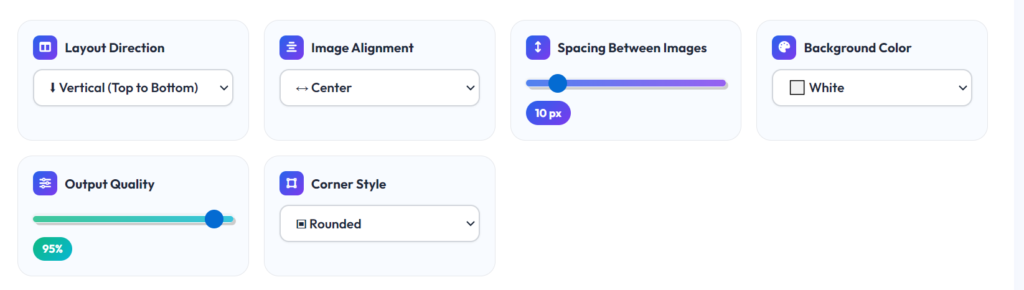
Adjust the image settings to create your perfect layout. Choose the layout direction, set the image alignment, control the spacing between images, select a background color, adjust the output quality, and pick a corner style. Your changes will be applied instantly to the final merged image.
Step 3: Press combine to JPG
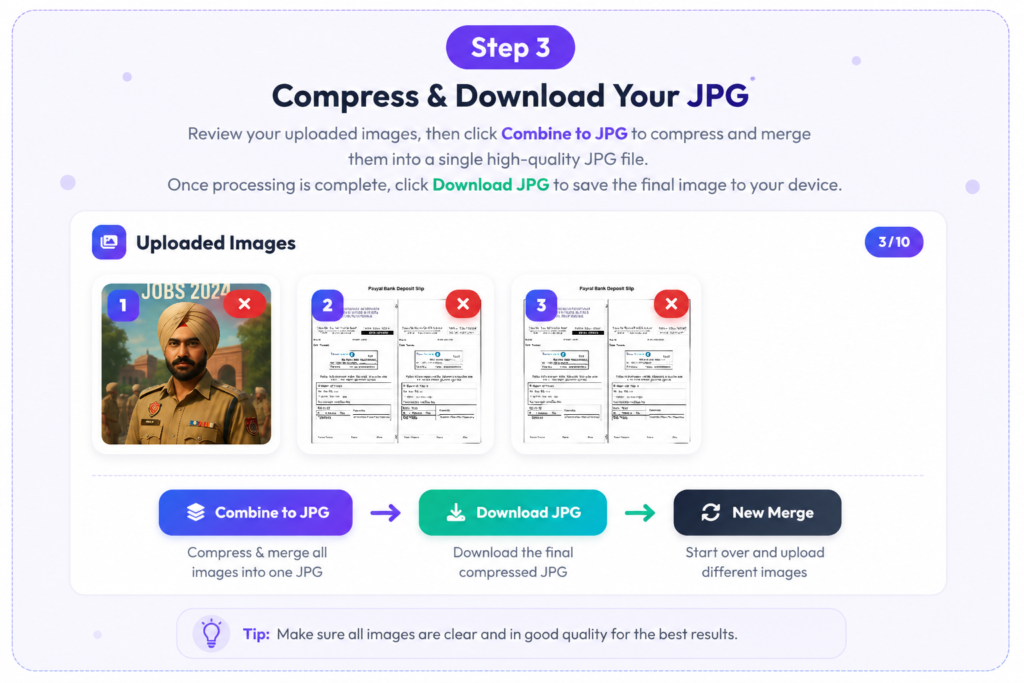
Once you have customized your settings, click the Combine to JPG button. Our tool will instantly merge your images according to your selected options and generate a high-quality JPG file ready to preview and download.
Why Choose Combine JPG to JPG Online?
Combine JPG To JPG Online makes merging images quick, simple, and hassle-free. Our tool is completely free and works directly in your browser, so no software installation is required. You can easily arrange images vertically or horizontally, customize spacing, background colors, and corner styles, and download high-quality JPG files in seconds.
our files remain private and secure because all processing happens online, making it the perfect solution for students, professionals, and anyone who needs to combine multiple images into one JPG quickly and efficiently.
Why Combine JPG to JPG is the Best JPG Combiner & Joiner Tool?
CombineJPGOnline.com is a fast, free, and easy-to-use tool that lets you combine multiple JPG images into a single high-quality file in just a few clicks. Whether you’re using a mobile phone, tablet, or desktop computer, our tool works seamlessly in your browser without requiring any software installation or registration. With powerful customization features and secure processing, it provides a smooth and hassle-free image merging experience.
- Fast and simple image combining process
- 100% free with no hidden charges
- No software installation required
- Fully compatible with mobile and desktop devices
- Supports both vertical and horizontal image layouts
- Customize spacing, background colors, and corner styles
- Generates high-quality JPG output
- Secure and privacy-friendly image processing
- Instant processing and quick downloads
- Accessible anytime from any modern web browser
Combine JPG to JPG Online Vs Other JPG Combiner Tools
| Feature | Combine JPG Online | Other JPG Combiner Tools |
|---|---|---|
| 🆓 Completely Free | ✅ Yes | ❌ Often Limited or Paid |
| 🚀 No Installation Required | ✅ Browser-Based | ❌ May Require Software Download |
| 📱 Works on Mobile & Desktop | ✅ Fully Responsive | ⚠️ Limited Device Support |
| 🖼️ Multiple Layout Options | ✅ Vertical & Horizontal | ⚠️ Basic Options Only |
| 🎨 Custom Background Colors | ✅ Available | ❌ Not Available on Many Tools |
| ↔️ Adjustable Image Spacing | ✅ Fully Customizable | ⚠️ Limited Control |
| ✨ Rounded Corner Styles | ✅ Supported | ❌ Usually Missing |
| 📸 High-Quality JPG Output | ✅ Up to 100% Quality | ⚠️ Quality Restrictions |
| 🔒 Secure & Private Processing | ✅ Files Processed Securely | ⚠️ Privacy Policies Vary |
| ⚡ Fast Processing Speed | ✅ Instant Image Combining | ⚠️ Can Be Slow with Large Files |
| 💻 No Registration Needed | ✅ Use Instantly | ❌ Some Require Sign-Up |
| 🌍 Accessible Anywhere | ✅ Works in Any Modern Browser | ⚠️ Platform Restrictions |
Winner: Combine JPG Online offers more customization, better quality control, and a faster, completely free experience without requiring downloads or sign-ups.
Frequently Asked Questions (FAQs) About Combine JPG Online
1. What is Combine JPG To JPG Online?
Combine JPG Online is a free web-based tool that lets you merge multiple JPG images into a single JPG file quickly and easily.
2. Is Combine JPG To JPG Online free to use?
Yes, our tool is completely free and does not require any subscription or registration.
3. Do I need to install any software?
No. Combine JPG Online works directly in your web browser, so there’s nothing to download or install
4. Can I combine multiple JPG to JPG images into one file?
Absolutely! You can upload multiple images and merge them into a single high-quality JPG image in just a few clicks.
5. Can I arrange images vertically or horizontally?
Yes. The tool allows you to choose between vertical (top-to-bottom) and horizontal (left-to-right) layouts.
6. Does the tool support background color selection?
Yes. You can choose different background colors, including white and transparent-style backgrounds, to match your preferences.