
Image to Text Converter
Extract text from any image instantly — JPG, PNG, WEBP, BMP supported. Free & 100% Private.
Step 1 — Upload Image
Step 2 — Settings
Step 3 — Extract Text
Extracted Text
Image to Text Converter – Extract Text from Images Online Free
In today’s digital world, images contain a lot of valuable information. From screenshots and scanned documents to handwritten notes and receipts, important text is often stored inside images. Manually typing that information can be time-consuming and frustrating. This is where an Image to Text Converter becomes extremely useful.
An Image to Text Converter uses OCR (Optical Character Recognition) technology to recognize characters in an image and convert them into editable text. Whether you want to extract text from a JPG, PNG, JPEG, WEBP, or screenshot, an online Image to Text Converter helps you do it quickly and accurately.
What Is an Image to Text Converter?
An Image to Text Converter is an online tool that extracts text from images and converts it into editable and copyable text. It uses OCR technology to scan the image, identify letters and numbers, and produce text output within seconds.
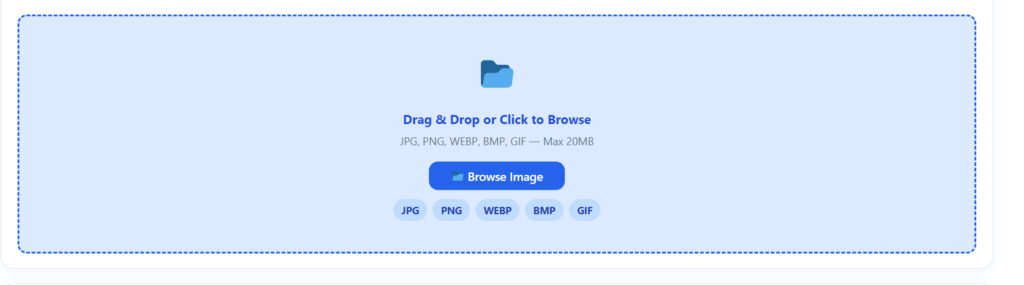
These tools support various image formats, including:
- JPG
- JPEG
- PNG
- WEBP
- GIF
- BMP
With an Image to Text Converter, users can avoid manual typing and save a significant amount of time.
How to Convert Image to text Through this Tool
The process behind an Image to Text Converter is simple and efficient:
Step 1: Upload Your Image : Select the image that contains text Through our Uploading section of the tool. It can be a screenshot, scanned document, photo, or handwritten note .
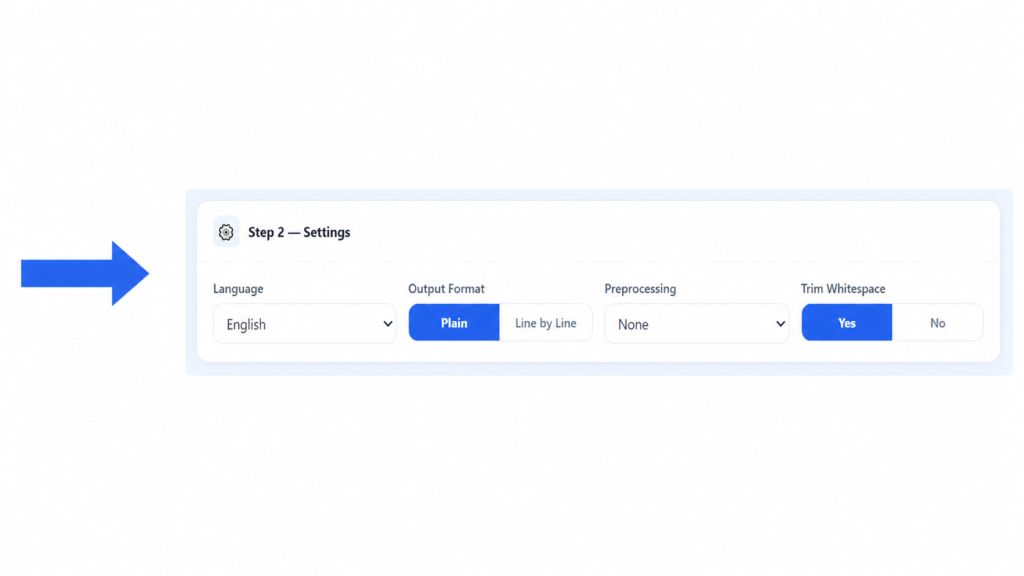
Step 2: Settings
In this step, users can customize the output settings according to their requirements. Select the preferred language from the dropdown menu, choose the output format (Plain text or Line by Line), select the required preprocessing option to improve results, and enable or disable Trim Whitespace to remove unnecessary spaces from the output. After adjusting all settings, proceed to the next step for processing.
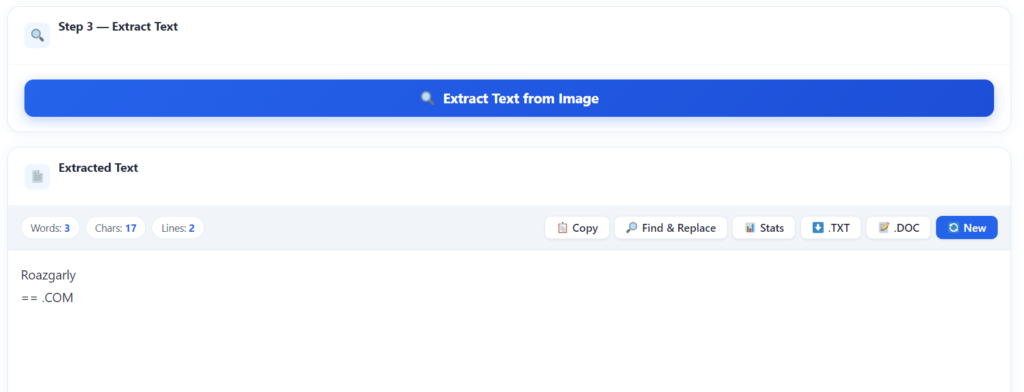
Step 3: Extract Text :Press the Extract the text Button The tool converts the detected text into editable digital text and You can copy the extracted text or download it for future use. The entire process usually takes only a few seconds.
Why Use an Image to Text Converter?
- Save Time
Quickly extract text from images instead of manually typing hundreds of words. - Improve Productivity
Helps students, professionals, and businesses convert image-based content into editable text and complete tasks faster. - Reduce Errors
OCR technology improves accuracy by reducing mistakes caused by manual typing. - Easy Accessibility
Extracted text can be edited, translated, shared, or saved in different formats easily. - Free and Online
Most Image to Text Converter tools are available online and work without installing any software.
Key Features of an Image to Text Converter
- Fast Conversion
Convert images into editable text within seconds without any delay. - Multiple Image Formats Supported
Supports popular formats like JPG, PNG, JPEG, WEBP, and many other image types. - Accurate OCR Technology
Advanced OCR technology provides accurate text recognition with fewer errors. - No Installation Required
Use the tool directly from your browser without downloading any software. - User-Friendly Interface
Simple and easy-to-use design suitable for both beginners and professionals. - Secure Processing
Files are processed securely, and many tools automatically remove uploaded files after conversion for better privacy.
Benefits of Using an Online Image to Text Converter
- Convert Screenshots into Editable Text
Extract text from screenshots instantly and copy important information without manual typing. - Extract Text from Scanned Documents
Easily digitize old documents, certificates, and records by converting scanned images into editable text. - Convert Handwritten Notes
Advanced OCR tools can recognize handwritten content and transform it into digital text. - Save Paper Documents Digitally
Businesses and organizations can create digital archives by converting physical documents into electronic files. - Improve Workflow Efficiency
Helps students and employees save time, organize information, and complete tasks more efficiently.
Image to Text Converter vs Manual Typing
| Feature | Image to Text Converter | Manual Typing |
|---|---|---|
| Speed | Very Fast | Slow |
| Accuracy | High | Depends on User |
| Effort | Minimal | High |
| Time Saving | Excellent | Poor |
| Productivity | High | Low |
| Cost | Free | Time Consuming |
Clearly, using an Image to Text Converter is much more efficient than typing everything manually.
Who Can Benefit from an Image to Text Converter?
Almost everyone can benefit from this technology:
- Students
- Teachers
- Bloggers
- Writers
- Researchers
- Accountants
- Office Employees
- Businesses
- Journalists
- Freelancers
Anyone who regularly works with images containing text can save time using OCR tools.
Tips for Better Image to Text Conversion Results
Select Clear Fonts
Printed text usually provides better results compared to complex handwriting styles.
Use High-Quality Images
Clear and high-resolution images improve text recognition accuracy and reduce errors.
Ensure Good Lighting
Use images with proper brightness and clear visibility of the text.
Avoid Cropping Important Text
Make sure the complete text area is visible before uploading the image.
Use Straight Images
Keep images properly aligned, as tilted or rotated images may affect OCR performance.
Benefits of Using an Online Image to Text Converter
Accessible Anywhere
All you need is an internet connection and a browser to use the tool anytime, anywhere.
Free to Use
Many online Image to Text Converter tools offer free text extraction services.
No Software Installation
Convert images directly through your web browser without downloading any application.
Cross-Platform Support
Works smoothly on multiple devices and operating systems, including:
- Windows
- Mac
- Linux
- Android
- iPhone
Instant Results
Extract text from images within seconds and get quick results.
Frequently Asked Questions
What is an Image to Text Converter?
An Image to Text Converter is an online tool that extracts text from images using OCR technology and converts it into editable text.
Is an Image to Text Converter free?
Yes, many online Image to Text Converters are completely free to use.
Which image formats are supported?
Most tools support JPG, JPEG, PNG, WEBP, GIF, BMP, and TIFF files.
Can OCR recognize handwritten text?
Advanced OCR tools can recognize many types of handwritten text, though printed text usually provides higher accuracy.
Is my uploaded image secure?
Most reputable Image to Text Converter tools process files securely and automatically remove them after conversion.
Can I use an Image to Text Converter on mobile devices?
Yes. Online Image to Text Converters work on Android, iPhone, tablets, Windows, and Mac devices.
Conclusion
An Image to Text Converter is an essential tool for anyone who wants to extract text from images quickly and accurately. Whether you are a student, professional, researcher, blogger, or business owner, OCR technology can save time and improve productivity.
Instead of manually typing information from screenshots, scanned documents, or photos, simply upload your image and let the converter do the work. With support for multiple formats, fast processing, and high accuracy, an Image to Text Converter makes text extraction easier than ever.
If you regularly deal with images containing text, using an online Image to Text Converter is one of the smartest ways to simplify your workflow and boost efficiency.