
JPG to PNG Merger Tool
Merge multiple JPG images into one PNG file — free, fast & no watermark
Merge JPG To PNG | New 100% Secure and Free Tool
Merge JPG to PNG online for free. Combine multiple JPG images into a single high-quality PNG file in seconds using CombineJPGOnline.com.
Need to combine multiple JPG images into one PNG file without installing software? Whether you’re creating photo collages, sharing screenshots, preparing documents, or designing social media graphics, a reliable image merger can save time and effort.
With Merge JPG to PNG, you can merge several JPG files into a single high-quality PNG image while maintaining excellent clarity. CombineJPGOnline.com offers a fast, secure, and beginner-friendly solution that works directly in your browser on any device.
What is Merge JPG to PNG?
Merge JPG to PNG is the process of combining two or more JPG images into one PNG file. Instead of downloading multiple pictures separately, you get a single PNG image that is easier to share, store, print, or upload.
PNG format also supports higher-quality output and is ideal for graphics, screenshots, presentations, and documents where image clarity matters.
How to Merge JPG to PNG Through Our Tool?
Step 1: Upload JPG Images
Upload one or multiple JPG images from your computer, tablet, or smartphone. You can add several files at once to save time.

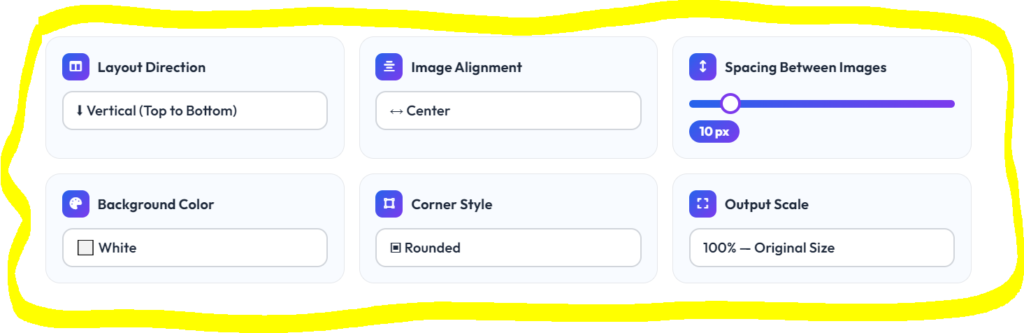
Step 2: Customize the Layout
Choose how you want your images to appear.
- Vertical Layout
- Horizontal Layout
- Grid Layout
You can also adjust:
- Background Color
- Image Alignment
- Corner Style
- Image Spacing
- Output Scale
Step 3: Click Merge to PNG
Press the Merge to PNG button. The tool instantly combines your uploaded JPG files into one PNG image directly inside your browser.
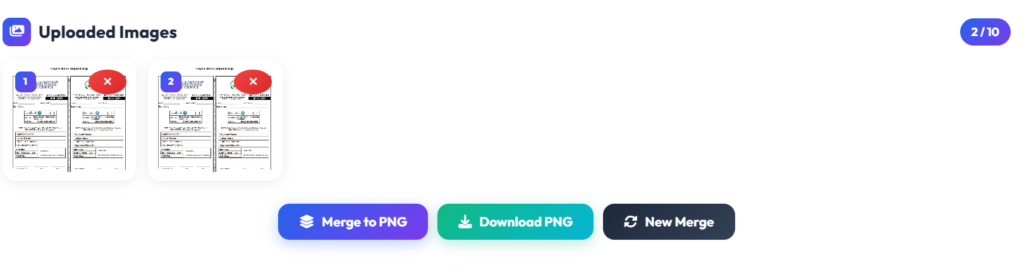
Step 4: Preview the Result
Check the merged PNG before downloading. If needed, change the layout or spacing and merge again until you’re satisfied.
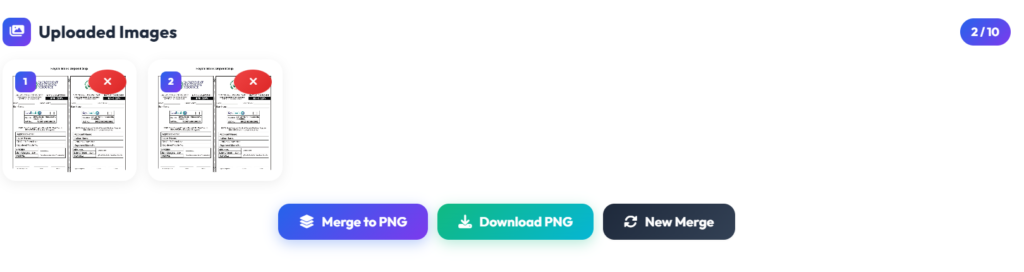
Step 5: Download Your PNG Image
Click Download PNG to save the final merged image. Your file is ready for sharing, printing, presentations, websites, or social media.
Why Use Merge JPG To PNG Tool?
- 100% Free – Merge JPG files into PNG without paying anything.
- Fast Processing – Create merged PNG images within seconds.
- No Watermark – Download clean, professional-quality images.
- Works on Every Device – Compatible with Windows, Mac, Android, iPhone, and tablets.
- No Installation Required – Everything runs directly in your browser.
- Easy to Use – Simple interface suitable for beginners and professionals.
- Multiple Layout Options – Choose vertical, horizontal, or grid layouts.
- Secure Processing – Your images remain private during the merging process.
Benefits of Merging JPG to PNG
- Creates a single image instead of multiple files.
- Makes sharing images much easier.
- Keeps image quality sharp with PNG output.
- Perfect for presentations, reports, and portfolios.
- Saves time when uploading multiple images.
- Organizes photos in a clean and professional format.
Merge JPG to PNG vs Other Tools
| Feature | CombineJPGOnline.com | Manual Editing | Other Online Tools |
|---|---|---|---|
| Free | ✅ Yes | ❌ Usually Paid | ⚠️ Limited |
| No Installation | ✅ Yes | ❌ No | ✅ Sometimes |
| Multiple Layouts | ✅ Yes | ⚠️ Manual Work | ⚠️ Limited |
| High-Quality PNG | ✅ Yes | ✅ Yes | ⚠️ Varies |
| Batch Upload | ✅ Yes | ❌ Difficult | ⚠️ Limited |
| Mobile Friendly | ✅ Yes | ❌ Limited | ✅ Usually |
| No Watermark | ✅ Yes | ✅ Yes | ❌ Often |
Tips for Best Results
- Upload high-quality JPG images for the best PNG output.
- Arrange images in the correct order before merging.
- Use grid layout when merging many images.
- Select a suitable background color for your design.
- Preview the final PNG before downloading.
- Keep a copy of the original JPG files.
Frequently Asked Questions
Can I merge multiple JPG files into one PNG?
Yes. CombineJPGOnline.com lets you merge multiple JPG images into a single PNG file.
Is the tool free?
Yes. The tool is completely free with no hidden charges.
Will my image quality decrease?
No. The PNG output preserves excellent image quality after merging.
Can I use the tool on my phone?
Yes. It works perfectly on Android, iPhone, tablets, laptops, and desktop computers.
Do I need to install software?
No. Everything works directly inside your web browser.
Is there a watermark?
No. Your downloaded PNG image is completely free from watermarks.
Conclusion
If you want a quick and simple way to Merge JPG to PNG, CombineJPGOnline.com provides everything you need in one place. Upload your JPG images, customize the layout, merge them into a high-quality PNG, and download the final file within seconds. No software, no registration, and no watermark—just a fast, secure, and completely free image merging experience.
Try CombineJPGOnline.com today and merge your JPG images into a single PNG file for free!